
Explain UX Vs. UI Design: Understanding The Difference
These situations show why UX and UI design are important.
When a business builds a website, mobile app, or digital product, appearance is only one part of the process. The product must also be easy to understand and use.
UX and UI design help businesses create better digital experiences. Although they work together, each has a different purpose.
In this article, we will explain UX vs. UI design, their key differences, and their importance for businesses.
What Is UX Design?
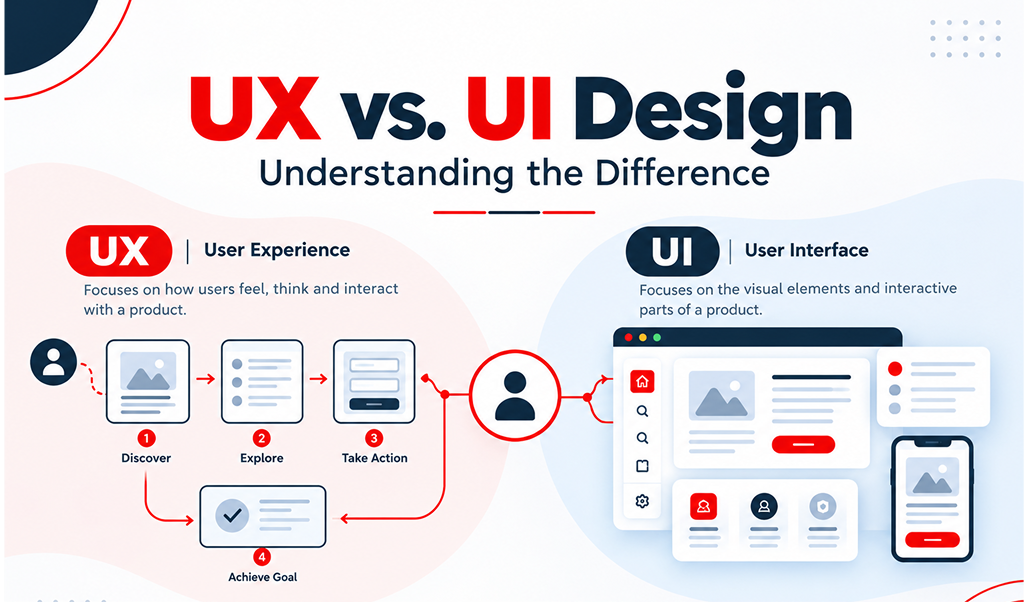
UX stands for User Experience. It describes how people feel when using a website, mobile app, software, or digital product.
UX design focuses on making digital products useful and easy to navigate. Its main goal is to help users complete tasks without confusion.
For example, imagine a customer shopping on an online store. They want to find a product, check its details, and complete a purchase.
A good user experience makes each step simple. However, confusing navigation or a complicated checkout process may cause the customer to leave.
What Does a UX Designer Do?
A UX designer studies users’ needs before planning how a digital product should work.
Their main responsibilities include:
-
User research: Understanding what users need and expect.
-
User journeys: Planning the steps users follow to complete tasks.
-
Information architecture: Organizing pages and content logically.
-
Wireframing: Creating basic layouts before visual design begins.
-
Usability testing: Checking whether users can complete tasks easily.
-
Experience improvement: Using feedback to identify and solve problems.
These activities help designers understand how people interact with digital products.
In simple terms, UX design focuses on making a website or app useful, clear, and easy to use.
What Is UI Design?
UI stands for User Interface. It refers to the visual and interactive elements of a website, mobile app, or digital product.
UI design focuses on how a product looks and how users interact with its interface. Common elements include colors, fonts, buttons, icons, images, forms, and page layouts.
For example, consider a business website with a contact form. The colors, text styles, button shapes, and spacing are all parts of its user interface.
A well-designed interface helps visitors understand where to look and what action to take next.
What Does a UI Designer Do?
A UI designer creates visual elements that make digital products attractive and consistent.
Their responsibilities often include:
-
Colors and typography: Choosing styles that match the brand.
-
Buttons and icons: Making interactive elements easy to recognize.
-
Page layouts: Arranging content for better readability.
-
Design consistency: Maintaining similar styles across pages.
-
Responsive interfaces: Adapting layouts to different screen sizes.
-
Prototypes: Showing how screens and interactions may look before development.
These elements help create an interface that looks professional and feels familiar.
In simple terms, UI design focuses on the visual appearance and interactive elements of a digital product.
UX vs. UI Design: What Is the Difference?
As UX and UI design are closely connected, their responsibilities differ.
Design focuses on the complete user experience. UI design focuses on the interface people see and interact with.
Here are the main differences:
UX Design vs. UI Design
UX Design
-
Focuses on the overall user experience.
-
Studies user behavior and needs.
-
Plans user journeys and information structure.
-
Creates wireframes and tests usability.
-
Helps users complete tasks easily.
-
Asks, “Is this product easy to use?”
UI Design
-
Focuses on the visual interface.
-
Develops colors, fonts, buttons, and icons.
-
Creates layouts and interactive elements.
-
Maintains a consistent visual style.
-
Makes the interface clear and attractive.
-
Asks, “Is this interface clear and visually appealing?”
Consider a contact form on a business website.
The UX designer decides where the form should appear and which details it should request. They also consider how many steps users must complete.
Meanwhile, the UI designer plans the appearance of the form. This includes its labels, fields, buttons, colors, and spacing.
Both roles contribute to a better experience. A beautiful form can still frustrate users if it is difficult to complete.
Why Are UX and UI Design Both Important?
A website may look attractive but still fail to meet users’ needs. Similarly, a functional website may create a poor impression if its design looks outdated.
UX and UI design help businesses address both problems. Here are five reasons why they matter.
1. They Make Websites Easier to Use
People usually visit websites with a specific goal. Some want to read information, while others want to buy products or contact a business.
Clear navigation helps visitors find what they need. Useful buttons and readable menus make the process easier.
Good UX and UI design reduce unnecessary confusion. They also help users complete their tasks with fewer difficulties.
2. They Create a Positive First Impression
A website often introduces a business to potential customers. Its appearance and usability can influence how visitors view the company.
Consistent colors, readable text, and organized layouts can make a website look professional. Simple navigation also helps visitors explore its services with confidence.
Although good design cannot guarantee trust, it can support a positive impression of the business.
3. They Support Business Goals
Businesses use websites and mobile apps to generate inquiries, sell products, and attract customers.
UX design helps users complete these actions without unnecessary steps. UI design makes important information and buttons easier to notice.
For example, a clear “Request a Quote” button can guide visitors towards contacting a service provider. A simple contact form can also make the inquiry process easier.
These improvements may support business goals by helping visitors take meaningful actions.
4. They Improve the Mobile Experience
Many people browse websites using smartphones. A website that works well on a computer may feel crowded on a smaller screen.
Responsive UI design adjusts layouts to different screen sizes. UX design considers mobile navigation, readable content, and easy-to-tap buttons.
Together, these practices help users browse websites on different devices. They also make important actions easier to complete.
5. They Can Support SEO Indirectly
Search engine optimization helps websites become more visible in search results. UX and UI design can support a better experience for visitors.
Clear menus help users discover relevant pages. Readable text and organized content make information easier to understand.
However, good design alone does not guarantee better rankings. Search visibility also depends on useful content, technical SEO, relevance, and other factors.
How Do UX and UI Designers Work Together?
UX and UI designers often collaborate throughout a project. Their shared goal is to create digital products that are useful and visually clear.
Although their responsibilities differ, both contribute to the final result.
Step 1: Understand the Users
The process often begins with research. Designers learn about the target audience, their needs, and the problems they want to solve.
This information helps the team make informed design decisions.
Step 2: Plan the User Experience
UX designers organize information and plan how users will move through the product. They may create user journeys and wireframes to show the proposed structure.
These plans provide a foundation for the visual design.
Step 3: Design the Interface
Once the structure is clear, UI designers develop the visual elements. They choose colors, typography, buttons, icons, and spacing.
Their work helps turn basic layouts into a clear and consistent interface.
Step 4: Test and Improve
Before launch, the team checks how the product works. Testing can reveal confusing layouts, unclear buttons, or difficult steps.
Designers then use feedback to make improvements. Testing may also continue after the product launches.
Example: Designing a Business Website
Imagine a company wants a website that attracts inquiries from potential customers.
The UX designer plans the service pages, navigation, and contact process. This makes it easier for visitors to find information and understand the company’s offerings.
The UI designer creates the visual layout. Clear headings, consistent colors, readable text, and visible buttons help visitors navigate the website.
For a company such as CodeXmattrix, combining UX and UI design can help align website design with user needs and business goals.
Common UX and UI Design Mistakes to Avoid
Some design mistakes can make websites difficult to use. Businesses should understand these problems before starting a design project.
1. Focusing Only on Appearance
Attractive visuals cannot solve every usability problem. A website must also help visitors find information and complete tasks.
2. Ignoring User Needs
Designing without understanding the audience can lead to confusing features. User research helps businesses understand what their customers expect.
3. Using Unclear Buttons
Button labels should explain what happens when someone clicks them. For example, “View Services” is more informative than a vague label.
4. Adding Too Many Elements
Too many buttons, animations, and pop-ups can distract visitors. A clean layout helps people focus on the information that matters.
5. Forgetting Mobile Users
Small text and crowded layouts can create problems on smartphones. Responsive design helps make websites more comfortable to use across devices.
6. Skipping Usability Testing
A design may look good but still confuse users. Testing helps identify problems before they affect more visitors.
Is UX or UI Design More Important?
Neither UX nor UI design is always more important than the other. Both serve different purposes and contribute to the overall quality of a digital product.
UX design deserves attention when users struggle to navigate a website or complete tasks. UI improvements may be needed when the interface looks inconsistent or important buttons are difficult to recognise.
In many cases, both areas need improvement. A website should be easy to use and visually clear.
Businesses should consider UX and UI design from the beginning of a project. Planning early can help identify problems before they become more expensive to fix.
UX, UI or Web Design: Which One Does Your Business Need?
The right choice depends on your business goals and current website.
UX design helps improve navigation, structure, and usability. UI design focuses on the interface’s appearance and interactive elements. Web design brings together several aspects of building a website, including layout, visual presentation, and responsive behaviour.
Small businesses and startups can benefit from considering all three areas. A clear and useful website can help visitors understand services and find relevant information.
Planning these elements early can also reduce the need for major changes later. The best approach is to create a website that meets user needs while supporting business objectives.
CodeXmattrix offers design and development services to businesses looking to improve their online presence. Before starting a project, businesses should identify their goals, target audience, and expected outcomes.
Frequently Asked Questions (FAQs)
1. What Is the Main Difference Between UX and UI Design?
UX design focuses on the overall experience of using a digital product. UI design focuses on its visual appearance and interactive elements.
2. Can a Website Have Good UI but Poor UX?
Yes, a website can look attractive but still be difficult to use. Confusing navigation and complicated processes can create a poor user experience.
3. Do Businesses Need UX and UI Design?
Yes, both can help businesses create better digital products. UX design improves usability, while UI design helps make the interface clear and visually appealing.
4. Is UX Design Part of Web Design?
Yes, UX design is an important part of the web design process. It helps make websites easier to navigate and use.
5. What Skills Are Required for UX and UI Design?
UX designers commonly need research, wireframing, planning, and usability-testing skills. UI designers need knowledge of layout, typography, colour theory, and visual design.
Both roles benefit from good communication and problem-solving skills.
6. Should UX or UI Design Come First?
UX planning often starts first because it helps establish the product’s structure and user journey. UI design then develops the visual interface.
However, both disciplines work together throughout the project. Feedback and testing may lead to improvements in either area.
Final Thoughts
Understanding UX vs. UI design helps businesses make informed decisions when creating websites, mobile apps, and digital products.
UX design focuses on making products useful and easy to navigate. UI design helps make their interfaces clear, consistent, and visually appealing.
When businesses consider both, they can create digital experiences that better meet users’ needs. A well-planned website can also support business goals by making information easier to find.
CodeXmattrix offers design and development services for businesses and individuals looking to build or improve their online presence.
Before starting your next digital project, think about what your users need and what you want them to achieve. A successful digital experience is not just about how a website looks. It is also about how easily people can use it.
